

Most people who work with Active Directory ACLs know that Deny should come before Allow, and that explicit permissions take precedence over inherited ones. But the mechanics behind that rule — and what actually happens when you violate it — are less well understood.
This post explains what canonical ACL order means, why it exists, and demonstrates what happens when you intentionally write a non-canonical ACL to Active Directory.
What Is an ACL?
A Discretionary Access Control List (DACL) is an ordered list of Access Control Entries (ACEs). Each ACE grants or denies a specific set of rights to a specific security principal (a user, group, or computer account).
The key word is ordered. The Windows security subsystem evaluates ACEs sequentially from the first entry to the last. That means the position of an ACE in the list is part of its meaning.
What Is Canonical Order?
Canonical order is a defined ordering of ACEs that Windows uses — and expects — in a DACL. The specification, from the Windows Security documentation, places ACEs in this sequence:
- Explicit deny ACEs (non-inherited, Deny)
- Explicit allow ACEs (non-inherited, Allow)
- Inherited deny ACEs
- Inherited allow ACEs
Within each category, object-specific ACEs come before non-object-specific ACEs.
The purpose of this ordering is straightforward: Deny must always be evaluated before Allow. If a deny ACE for an operation precedes the allow ACE for the same operation, the deny wins regardless of what comes later. If the order is reversed, the result depends on how far the access check evaluates before accumulating sufficient rights.
How Windows Evaluates ACEs
The Windows AccessCheck() function processes ACEs in order. It maintains a running set of granted rights and a set of remaining desired rights. The evaluation works roughly as follows:
- If a Deny ACE matches a requested right → access denied immediately
- If an Allow ACE matches → add those rights to the granted set; remove from remaining
- If all desired rights have been granted → access allowed
- If the end of the DACL is reached without granting all rights → access denied
The critical detail here is step 3: once all desired rights are accumulated, the check stops. ACEs that appear later in the list are never evaluated.
This means that if an Allow ACE appears before a Deny ACE, the Allow ACE may grant the requested right before the Deny ACE is ever reached — and the access check succeeds even though a deny was intended.
Object ACE vs Common ACE
An AD ACE can be one of two types:
CommonAce — used when neither an ObjectType GUID nor an InheritedObjectType GUID is present. This is a standard allow or deny for a generic right.
ObjectAce — used when the ACE carries a specific object class GUID, an extended right GUID, or both. Most AD delegation is expressed as ObjectAce entries: for example, “allow CreateChild for objects of class computer” or “allow User-Force-Change-Password on user objects”.
If you are working with RawSecurityDescriptor, you can distinguish them with an is check:
if ($ace -is [System.Security.AccessControl.ObjectAce]) {
    # has ObjectAceType and/or InheritedObjectAceType GUIDs
} else {
    # CommonAce — no object-specific GUIDs
}
When Canonicalization Is Desirable
For normal administration — delegation, helpdesk permissions, GPO security — canonical order is the right choice. It gives you:
- Predictable, deterministic access evaluation
- Compatibility with GUI tools (ADUC, ADSS,
dsacls,icacls) - Correct semantics when Deny and Allow ACEs coexist
- Easier auditing
Every tool in the Windows administration stack — Active Directory Users and Computers, the Delegation of Control Wizard, dsacls, Set-Acl — writes canonical ACLs.
When Canonicalization Is Harmful
For backup, restore, migration, and any tooling that requires bit-perfect fidelity, automatic canonicalization is a problem. If the API silently reorders ACEs during a roundtrip, the restored ACL is not byte-identical to the original — and in some edge cases it may not even be semantically identical.
This is one of the core reasons why System.DirectoryServices.ActiveDirectorySecurity.AddAccessRule() is unsuitable for restore operations: it canonicalizes as a side effect. See the companion post for details.
The write path has two distinct parts. First, RawAcl.InsertAce() is used to construct the DACL: it inserts each ACE at exactly the index you specify, with no reordering. Second, the serialized binary form is written back to AD via GetBinaryForm(), SetSecurityDescriptorBinaryForm(), and CommitChanges(). Both steps preserve positional order — InsertAce() builds the ACL as intended, and the binary write path carries it to the DC without the API imposing canonical sorting.
Does AD Always Canonicalize on Write?
A common assumption is that the domain controller always re-canonicalizes an ACL when it is committed, so any non-canonical input gets “fixed” on the server side.
This is not always true.
Testing shows that when a security descriptor is written via ObjectSecurity.SetSecurityDescriptorBinaryForm() followed by CommitChanges(), the LSASS canonicalizer on the DC does not always reorder the ACL. The behavior varies by:
- Windows Server version
- Domain functional level
- The specific ACE types involved
- The commit path used (ADSI vs LDAP API vs
SetSecurityInfo)
In some cases you will see the DC reorder the ACL. In others, the non-canonical order survives the commit.
Proof of Concept: Allow Before Deny in Active Directory
The following script demonstrates that it is possible to write a non-canonical ACL to an AD object with Allow appearing before Deny — and that the DC may preserve this ordering.
The test creates two object-specific ACEs for CreateChild computer on a target OU for the user CONTOSO\User1:
- An Allow ACE at position 0
- A Deny ACE appended at the end
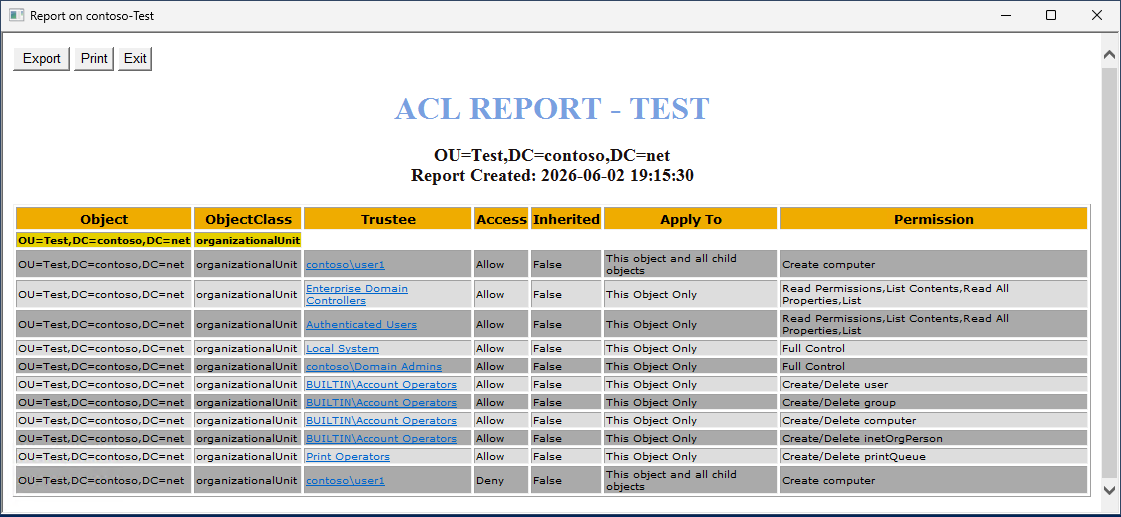
In this picture we can see that CONTOSO\User1 has both Allow and Deny for creating computer objects, but normally the Deny ACE should be at the top.
In a canonical ACL, the Deny would appear first. Here we deliberately invert the order using InsertAce() to bypass any canonicalization that AddAccessRule() would impose.
Here is the code to accomplish this:
Import-Module ActiveDirectory

function Get-UserSID {
    param(
        [Parameter(Mandatory)]
        [string]$Domain,

        [Parameter(Mandatory)]
        [string]$SamAccountName
    )

    $account = New-Object System.Security.Principal.NTAccount("$Domain\$SamAccountName")
    $sid = $account.Translate([System.Security.Principal.SecurityIdentifier])
    return $sid.Value
}

# Usage
$sid = Get-UserSID -Domain "CONTOSO" -SamAccountName "User1"

$dn = "OU=Test,DC=contoso,DC=net"

# computer class GUID
$computerGuid = [Guid]"bf967a86-0de6-11d0-a285-00aa003049e2"

# ADSI bind
$de = [ADSI]"LDAP://$dn"

# IMPORTANT:
# Use ObjectSecurity instead of ntSecurityDescriptor property
$adsSecurity = $de.ObjectSecurity

# Get raw binary SD
$sdBytes = $adsSecurity.GetSecurityDescriptorBinaryForm()

# Build Raw SD
$rawSD = New-Object System.Security.AccessControl.RawSecurityDescriptor(
    $sdBytes,
    0
)

$dacl = $rawSD.DiscretionaryAcl

$csd = New-Object System.Security.AccessControl.CommonSecurityDescriptor `
(
    $false,
    $false,
    $sdBytes,
    0
)

Write-Host ""
Write-Host "Initial Canonical:" $csd.DiscretionaryAcl.IsCanonical
Write-Host ""

# Empty DACL
$newDacl = New-Object System.Security.AccessControl.RawAcl(
    [System.Security.AccessControl.GenericAcl]::AclRevisionDS,  # = 4
    2
)

for($i=0;$i -lt $rawSD.DiscretionaryAcl.Count;$i++)
{
    $newDacl.InsertAce($i,$rawSD.DiscretionaryAcl[$i])
}

# ALLOW CreateChild Computer
$allowAce = New-Object System.Security.AccessControl.ObjectAce `
(
    [System.Security.AccessControl.AceFlags]::ContainerInherit,
    [System.Security.AccessControl.AceQualifier]::AccessAllowed,
    [System.DirectoryServices.ActiveDirectoryRights]::CreateChild,
    $sid,
    [System.Security.AccessControl.ObjectAceFlags]::ObjectAceTypePresent,
    $computerGuid,
    [Guid]::Empty,
    $false,
    $null
)

# DENY CreateChild Computer
$denyAce = New-Object System.Security.AccessControl.ObjectAce `
(
    [System.Security.AccessControl.AceFlags]::ContainerInherit,
    [System.Security.AccessControl.AceQualifier]::AccessDenied,
    [System.DirectoryServices.ActiveDirectoryRights]::CreateChild,
    $sid,
    [System.Security.AccessControl.ObjectAceFlags]::ObjectAceTypePresent,
    $computerGuid,
    [Guid]::Empty,
    $false,
    $null
)

# WRONG ORDER:
$newDacl.InsertAce(0,$allowAce)

$newDacl.InsertAce(
    $newDacl.Count,
    $denyAce
)

$rawSD.DiscretionaryAcl = $newDacl

Write-Host "After Insert Canonical:" $rawSD.DiscretionaryAcl.IsCanonical
Write-Host ""

# Write back to AD
$bytes = New-Object byte[] ($rawSD.BinaryLength)

$rawSD.GetBinaryForm($bytes,0)

$adsSecurity.SetSecurityDescriptorBinaryForm($bytes)

$de.ObjectSecurity = $adsSecurity
$de.CommitChanges()

Write-Host "ACL written."
Write-Host ""

# Re-read from AD
$de2 = [ADSI]"LDAP://$dn"

$verifyBytes = $de2.ObjectSecurity.GetSecurityDescriptorBinaryForm()

$verifySD = New-Object System.Security.AccessControl.RawSecurityDescriptor(
    $verifyBytes,
    0
)

$csd = New-Object System.Security.AccessControl.CommonSecurityDescriptor `
(
    $false,
    $false,
    $verifyBytes,
    0
)

Write-Host "Canonical after AD write:" $csd.DiscretionaryAcl.IsCanonical
Write-Host ""

Write-Host "ACE order after AD save:"
Write-Host ""

$i = 0

foreach($ace in $verifySD.DiscretionaryAcl)
{
    Write-Host "$i : $($ace.AceQualifier)"
    $i++
}
What This Shows
When you run this script against a test OU, you may observe one of three outcomes:
Outcome A — AD preserved the non-canonical order:
[0] AccessAllowed — CreateChild
[1] AccessDenied  — CreateChild
This is the dangerous case. The Allow ACE is evaluated first. If a caller requests CreateChild rights, the access check accumulates that right from the Allow ACE and stops — the Deny ACE is never reached. The principal can create computer objects despite the explicit deny.
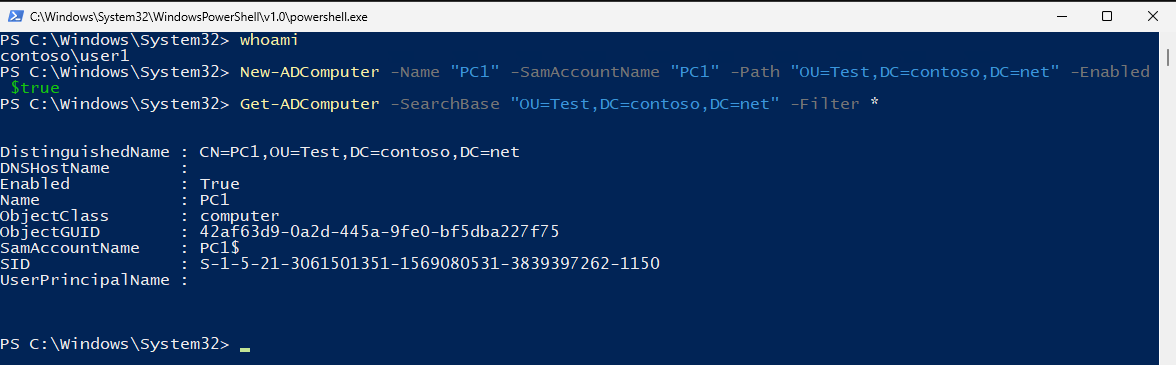
In this picture user CONTOSO\User1 can create computer objects in the target OU, even with a Deny ACE.
Outcome B — AD canonicalized on write:
[0] AccessDenied  — CreateChild
[1] AccessAllowed — CreateChild
The DC reordered the ACL. The Deny wins as expected.
Outcome C — CommitChanges() throws a constraint violation but the write partially succeeded: This is an ADSI behavior where the server modifies the submitted security descriptor during commit, and the ADSI COM layer detects the mismatch and raises an error even though the write completed. Read back the ACL to determine what was actually stored.
Duplicate Access Control Entries
Normally, AddAccessRule() deduplicates and merges ACEs together for a security principal, meaning you will not see a user have the same permission delegated more than once in the ACL. But by bypassing these checks we can have as many of the same as we like.
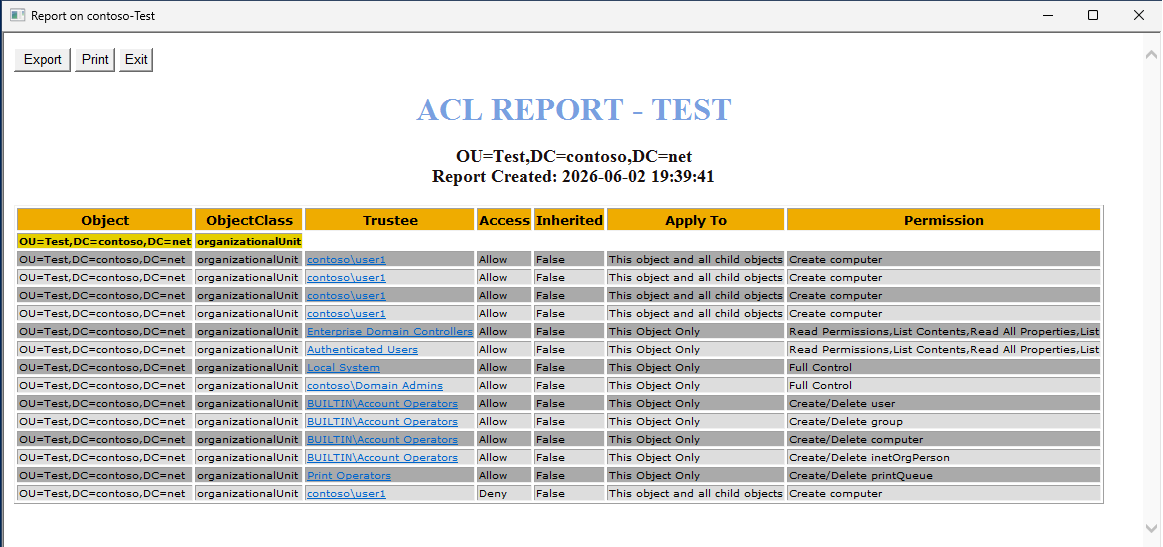
In this picture we can see that CONTOSO\User1 has four of the identical Access Control Entries.
Detection
So how can you determine if a DACL is in canonical order? Some tools like DSA.MSC (Active Directory Users and Computers) will warn you and let you decide whether you want to apply a canonical order.
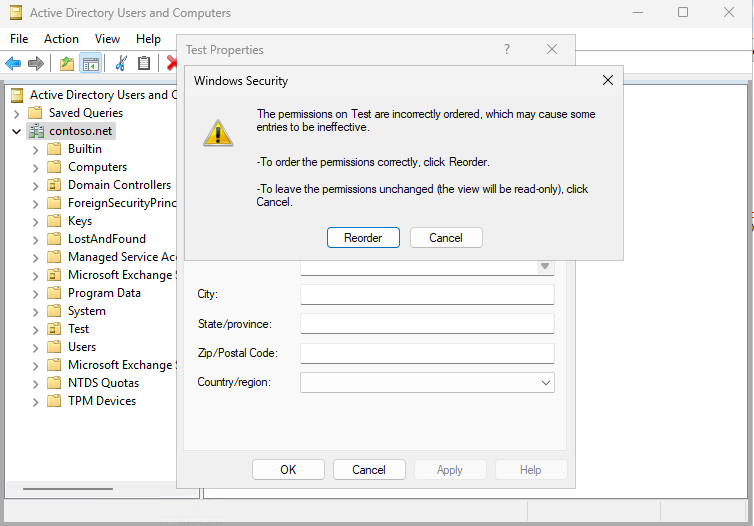
Programmatically, you can use CommonSecurityDescriptor, which exposes an IsCanonical property on its DiscretionaryAcl:
$dn = "OU=Test,DC=contoso,DC=net"

# ADSI bind
$de = [ADSI]"LDAP://$dn"

# IMPORTANT:
# Use ObjectSecurity instead of ntSecurityDescriptor property
$adsSecurity = $de.ObjectSecurity

# Get raw binary SD
$sdBytes = $adsSecurity.GetSecurityDescriptorBinaryForm()


$csd = New-Object System.Security.AccessControl.CommonSecurityDescriptor `
(
    $false,
    $false,
    $sdBytes,
    0
)

Write-Host "Initial Canonical:" $csd.DiscretionaryAcl.IsCanonical
Why This Matters in Practice
The practical implication is that non-canonical ACLs are a real security concern in environments where:
- Raw security descriptor restore is performed without explicit canonicalization
- Migration tools write ACLs via binary LDAP
- Scripts use
InsertAce()without understanding the ordering requirements - Non-canonical ACLs are imported from another system
A non-canonical ACL that reaches AD and survives the write — which, as demonstrated above, is possible — can silently undermine Deny ACEs. The access result becomes unpredictable, varying by API, token state, generic right mapping, and whether inherited ACEs are involved.
Microsoft’s official position on non-canonical ACLs is that their behavior is undefined. That is accurate, but it understates the risk: undefined does not mean harmless.
What Tools Should Do
Restore / migration mode
Write ACEs in their original order using InsertAce() and do not canonicalize. Your goal is bit-perfect fidelity to the source, including any non-canonical ordering that was present in the original.
New delegation authoring mode
Canonicalize explicitly before writing. Do not rely on AddAccessRule() to do this for you — it canonicalizes, but it also merges, mutates flags, and loses information. Instead, sort the final RawAcl yourself by the canonical ordering rules, then write it via binary form.
A simple canonical sort orders ACEs as:
- Explicit Deny (non-inherited,
AceQualifier.AccessDenied, noInheritedflag inAceFlags) - Explicit Allow (non-inherited,
AceQualifier.AccessAllowed, noInheritedflag inAceFlags) - Inherited Deny (
Inheritedflag set,AccessDenied) - Inherited Allow (
Inheritedflag set,AccessAllowed)
Within each category, ObjectAce entries come before CommonAce entries.
Summary
Canonical ACL order exists because Windows evaluates ACEs sequentially from the first entry to the last. Deny ACEs must precede Allow ACEs or the Deny may never be reached during access evaluation.
AD does not always enforce canonical ordering when a security descriptor is written via raw binary LDAP. Non-canonical ACLs can survive the commit and create conditions where Allow overrides Deny.
Tools that work with RawSecurityDescriptor have the power to write ACLs with precise fidelity — including non-canonical ordering, intentionally or by mistake. That same power means the tool author is responsible for understanding and managing ACE order explicitly, rather than relying on the API to get it right.
This post is the second in a short series on AD ACL internals. The companion post covers the design problems in System.DirectoryServices.ActiveDirectorySecurity that make it unsuitable for fidelity-critical tooling.